Nested SUBTOTAL Functions
The SUBTOTAL function returns the subtotal of values in a list, table or cell range.
You can have a subtotal with more than one summary function. Add the first function and then select (Data > Subtotals) choosing the additional function from the "use function" drop down box.
You can create nested subtotals by selecting and data and choosing (Data > Subtotals) and choosing a different labels from the "At each change in" drop-down box.
If you filter on a particular value, Excel will automatically generate a row of SUBTOTALs at the bottom of the filtered results. The first parameter in the SUBTOTAL(FncNum, Range) is the summary function used in the subtotal.
include link to Outlines
Data | Subtotals lets you do Outlining specifying the data breaks and what kind of subtotals you want at those breaks. The Outlining plus and minuses at the left let you control the level of detail that is displayed.
In Excel 2013 (and earlier) only cells that had formulas starting with "=SUBTOTAL" were excluded.
Lets imagine that instead of using filtering on our data to see the subtotals we want a more dynamic structure
Consider the following table of data
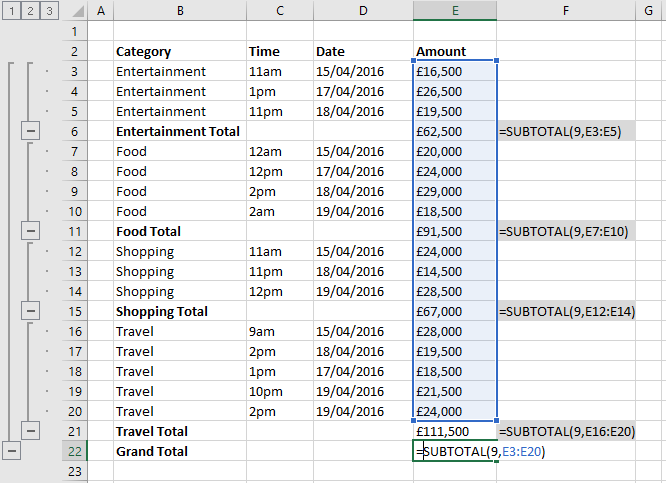 |
Ignoring all Formulas containing SUBTOTAL
© 2026 Better Solutions Limited. All Rights Reserved. © 2026 Better Solutions Limited TopPrevNext