COUNTVISIBLEIFS
COUNTVISIBLEIFS(criteria_range1, criteria1 [,criteria_range2] [,criteria2])
COUNTVISIBLEIFS(rgeCountRange, sCriteria1, sCriteriaRange1 [,Criteria2, Range2] [,..])
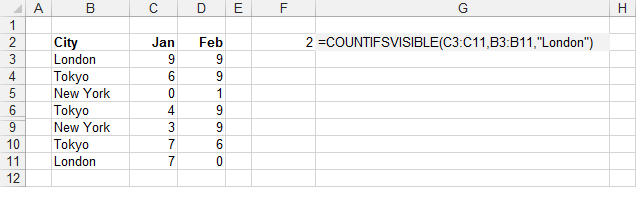
Returns the number of visible, non blank cells that satisfies multiple conditions.
| rgeCountRange | The range of cells containing the criteria you want to check. |
| criteria_range1 | The range of corresponding values you want the count of. |
| criteria1 | The expression that contains the criteria. |
| criteria_range2 | (Optional) The range of cells you want evaluated. |
| criteria2 | (Optional) The expression that contains the criteria. |
REMARKS
* This function excludes hidden cells caused by AutoFilter, Grouping or that have been Manually Hidden.
* You can use the built-in COUNTIFS function to include hidden cells.
* You can use the add-in COUNTVISIBLE function to
* You can use the add-in AVERAGEVISIBLEIFS function to
* You can use the add-in MAXVISIBLEIFS function to
* You can use the add-in MINVISIBLEIFS function to
* You can use the add-in SUMVISIBLEIFS function to
* You can use the user defined COUNTVISIBLEA function to
* You can use the user defined MEDIANVISIBLEIFS function to
| | A | | 1 | =JS.COUNTVISIBLEIFS(A2:A8,"London") |
|
Public Function COUNTVISIBLEIFS( _
         ByVal rgeCountRange As Range, _
         ParamArray avCriteriaAndRanges() As Variant) _
         As Single

Dim avCriterias() As Range
Dim asCriterias() As String
Dim icriteriacount As Integer
Dim rgeCriteria As Range
Dim sCriteria As String
Dim iitemcount As Integer
Dim lrowno As Long
Dim lmatch As Long
Dim arsngvalues() As Single
Dim sngmedian As Single
Dim bsorted As Boolean
Dim vcell As Range
Dim vcellvalue As Variant

   Application.Volatile (True)

   If UBound(avCriteriaAndRanges, 1) Mod 2 > 0 Then
      'not the correct amount of arguments
   End If

   ReDim avCriterias(UBound(avCriteriaAndRanges, 1))
   ReDim asCriterias(UBound(avCriteriaAndRanges, 1))
   icriteriacount = 1

   For iitemcount = 0 To UBound(avCriteriaAndRanges, 1) Step 2

      If TypeName(avCriteriaAndRanges(iitemcount)) = "Range" Then
         Set rgeCriteria = avCriteriaAndRanges(iitemcount)
      End If
      If TypeName(avCriteriaAndRanges(iitemcount + 1)) = "String" Then
         sCriteria = CStr(avCriteriaAndRanges(iitemcount + 1))
      End If

      Set avCriterias(icriteriacount - 1) = rgeCriteria
      asCriterias(icriteriacount - 1) = sCriteria
      icriteriacount = icriteriacount + 1
   Next iitemcount

   ReDim Preserve avCriterias(icriteriacount - 2)
   ReDim Preserve asCriterias(icriteriacount - 2)

   For lrowno = 1 To rgeCriteria.Rows.Count
      Set vcell = rgeCriteria.Parent.Cells(rgeCriteria.Row + lrowno - 1, rgeCountRange.Column)
      vcellvalue = rgeCriteria.Parent.Cells(rgeCriteria.Row + lrowno - 1, rgeCountRange.Column).Value

      If Row_MatchesAllCriteria(lrowno, avCriterias, asCriterias) = True And _
         vcell.EntireRow.Hidden = False Then
         lmatch = lmatch + 1
      End If

      If lmatch > 0 And IsEmpty(vcellvalue) = True Then Exit For
   Next lrowno

   COUNTVISIBLEIFS = lmatch
End Function

Public Function Row_MatchesAllCriteria(ByVal lrowno As Long, _
                                       ByVal vArrayCriteria As Variant, _
                                       ByVal sArrayCriteria As Variant) As Boolean

Dim avCriterias() As Range
Dim asCriterias() As String
Dim rgeCriteria As Range
Dim sCriteria As String

Dim iitemcount As Integer
Dim bmatch As Boolean
Dim iconditioncolno As Integer
Dim icriteriacount As Integer

   ReDim avCriterias(UBound(vArrayCriteria, 1))
   ReDim asCriterias(UBound(sArrayCriteria, 1))

   For iitemcount = 0 To UBound(vArrayCriteria, 1)
      If TypeName(vArrayCriteria(iitemcount)) = "Range" Then
         Set rgeCriteria = vArrayCriteria(iitemcount)
      End If
      If TypeName(sArrayCriteria(iitemcount)) = "String" Then
         sCriteria = CStr(sArrayCriteria(iitemcount))
      End If

      Set avCriterias(iitemcount) = rgeCriteria
      asCriterias(iitemcount) = sCriteria
   Next iitemcount

   bmatch = True
   For icriteriacount = 0 To UBound(avCriterias, 1)
      iconditioncolno = avCriterias(icriteriacount).Column

      Dim tempCondition As String
      Dim tempCellValue As String
      tempCondition = asCriterias(icriteriacount)
      'check the symbol and add the default equals if not there
      If ((Left(tempCondition, 1) <> "<") And _
          (Left(tempCondition, 1) <> ">")) Then

         If (Left(tempCondition, 1) <> "=") Then tempCondition = "=" & tempCondition
      End If

      tempCellValue = avCriterias(icriteriacount).Parent.Cells(avCriterias(icriteriacount).Row + lrowno - 1, iconditioncolno).Value
      If (Criteria_Check(tempCondition, tempCellValue) = True) Then
      Else
         bmatch = False
      End If

   Next icriteriacount

   Row_MatchesAllCriteria = bmatch
End Function

Public Function Criteria_Check(ByVal sCriteria As String, _
                               ByVal sValue As String) As Boolean

    If ((InStr(sCriteria, "*") > 0) And (InStr(sCriteria, "~*") = 0)) Or _
       ((InStr(sCriteria, "?") > 0) And (InStr(sCriteria, "~?") = 0)) Then
        If (Left(sCriteria, 1) = "=") Then sCriteria = Right(sCriteria, Len(sCriteria) - 1)
        Criteria_Check = (sValue Like sCriteria)
        Exit Function
    End If
    If (Left(sCriteria, 1) = "=") Then
        Criteria_Check = (sValue = Right(sCriteria, Len(sCriteria) - 1))
        Exit Function
    End If
    If (Left(sCriteria, 1) = ">") And _
       (Left(sCriteria, 2) <> ">=") Then
        Criteria_Check = (CSng(sValue) > CSng(Right(sCriteria, Len(sCriteria) - 1)))
        Exit Function
    End If
    If (Left(sCriteria, 1) = "<") And _
       (Left(sCriteria, 2) <> "<=") And (Left(sCriteria, 2) <> "<>") Then
        Criteria_Check = (CSng(sValue) < CSng(Right(sCriteria, Len(sCriteria) - 1)))
        Exit Function
    End If
    If (Left(sCriteria, 2) = ">=") Then
        Criteria_Check = (CSng(sValue) >= CSng(Right(sCriteria, Len(sCriteria) - 2)))
        Exit Function
    End If
    If (Left(sCriteria, 2) = "<=") Then
        Criteria_Check = (CSng(sValue) <= CSng(Right(sCriteria, Len(sCriteria) - 2)))
        Exit Function
    End If
    If (Left(sCriteria, 2) = "<>") Then
        Criteria_Check = (CSng(sValue) <> CSng(Right(sCriteria, Len(sCriteria) - 2)))
        Exit Function
    End If
    Criteria_Check = sValue Like sCriteria
End Function
 |
© 2026 Better Solutions Limited. All Rights Reserved. © 2026 Better Solutions Limited TopPrevNext