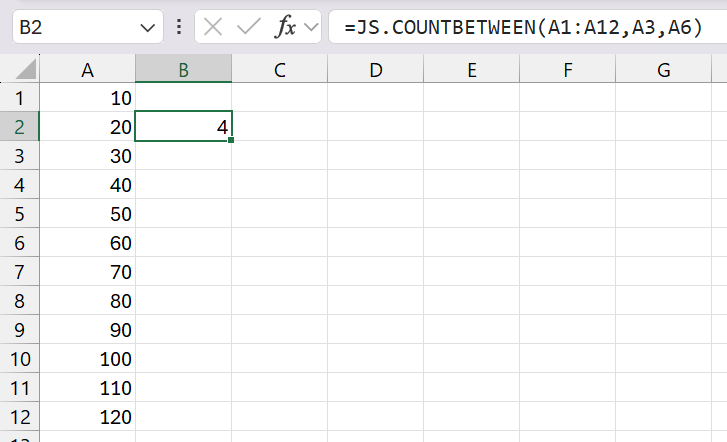
COUNTBETWEEN

COUNTBETWEEN(range, min_value, max_value)
Returns the number of cells that have a value that is between "min_value" and "max_value".

rangeThe range of cells you want to count.
min_valueThe smallest value (inclusive).
max_valueThe largest value (inclusive).

REMARKS
* The values can be numbers or dates.
* You can use the built-in COUNT function to
* You can use the add-in COUNTFORMAT function to
* You can use the add-in COUNTSUBSTRING function to
* You can use the user defined MAXBETWEEN function to
* You can use the user defined MINBETWEEN function to
* You can use the user defined SUMBETWEEN function to
* You can use the user defined ISBETWEEN function to

 A
1=JS.COUNTBETWEEN(23,23,23)

Public Function COUNTBETWEEN( _ 
         ByVal rgeValues As Range, _
         ByVal minValue As Single, _
         ByVal maxValue As Single, _
Optional ByVal bInclusive As Boolean = True) _
         As Variant

Dim objcell As Range
Dim itotalcells As Integer

    itotalcells = 0
    
    If (rgeValue.Cells.Count > 10000) Then
       COUNTBETWEEN = "no column references"
       Exit Function
    End If
    
    If (bInclusive = True) Then
      For Each objcell In rgeValue
         If (objcell.Value >= minValue) And (objcell.Value <= maxValue) Then
            itotalcells = itotalcells + 1
         End If
      Next objcell
    End If
    
    If (bInclusive = False) Then
      For Each objcell In rgeValue
         If (objcell.Value > minValue) And (objcell.Value < maxValue) Then
            itotalcells = itotalcells + 1
         End If
      Next objcell
    End If
    
    COUNTBETWEEN = itotalcells
End Function

© 2026 Better Solutions Limited. All Rights Reserved. © 2026 Better Solutions Limited TopPrevNext