Functions $
All these String Functions actually return a Variant data type.
However there are identical functions that can return a String data type. These are suffixed with a dollar sign ($).
The $ at the end is actually the Type Declaration Suffix for the String data type.
This suffix provides a shorthand for indicating the data type.
LEFT - The functions without the dollar return a Variant data type.
LEFT$ - The functions that have a dollar return a String data type.
Dollar Functions - String Data Type
If you pass the result back to a String data type and use the LEFT function, a conversion from Variant to String is performed (automatically).
For most of us this is absolutely fine and something we would not even be aware of.
For some, this data type conversion (from Variant to String) seems unnecessary and is not thought to be very efficient.
If you pass the result back to a String data type and use the LEFT$ function, the conversion will not take place.
Dollar Functions - Variant Data Type
If you pass the result back to a Variant data type and use the LEFT function, a conversion does not take place.
If you pass the result back to a Variant data type and use the LEFT$ function, a conversion from String to Variant is performed (automatically).
Locals Window
It is possible to see these different data types by using the Locals Window.
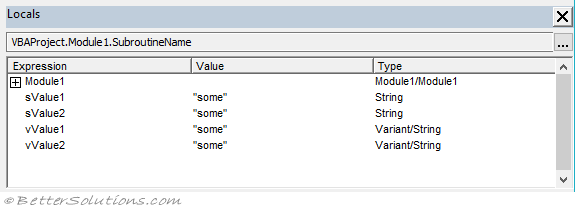 |
You cannot use the TYPENAME function to see the different data types.
Whether you are declaring your variables as Strings or Variants the string returned from TYPENAME is "String" in both cases.
Which Functions are Faster ?
There are rumours that the Dollar Functions are faster but this is really not worth worrying about.
Unless you are iterating through hundreds of thousands of times, there is no difference.
We ran some tests iterating 300,000 times and the results can be seen here
© 2026 Better Solutions Limited. All Rights Reserved. © 2026 Better Solutions Limited TopPrevNext