Attaching
Creating a template
Templates and add-ins can be loaded either for the current session only or whenever you start Word.
On the Tools menu, click Templates and Add-Ins.
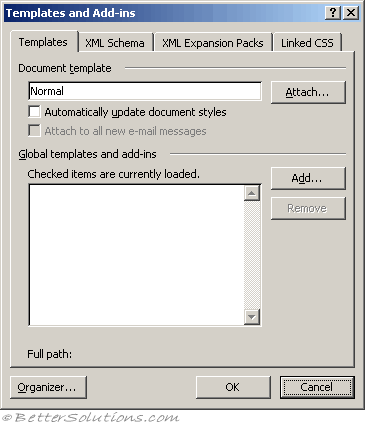 |
Under Global templates and add-ins, select the check box next to the template or add-in you want to load.
If the template or add-in you want does not appear in the box, click Add, switch to the folder that contains the template or add-in you want, click it, and then click OK.
what happens when a global template is loaded and then later the file is deleted or unavailable ?
it stays in the list?
Removing
Removing a template
Every document must have a template attached to it.
The default template is Normal and this one should be used when you do not want to use a custom template.
Developer tab, Document Template tab.
To remove the template completely replace this folder path and filename with "Normal"
Normal
© 2026 Better Solutions Limited. All Rights Reserved. © 2026 Better Solutions Limited TopPrevNext