SPELLNUMBER
SPELLNUMBER(number [,unit_plural] [,unit_single] [,decimal_plural] [,decimal_single] [,display_fraction] [,include_and] [,include_only] [,include_commas])
Returns the text after converting a number into words.
| number | The number you want to spell out. |
| unit_plural | (Optional) The unit to use for whole numbers. |
| unit_single | (Optional) The unit to use for 'single' whole numbers. |
| decimal_plural | (Optional) The unit to use for decimal numbers. |
| decimal_single | (Optional) The unit to use for 'single' decimal numbers. |
| display_fraction | (Optional) A logical value indicating if the decimal is displayed as a fraction: False = 0.5 is displayed as 50 (default) True = 0.5 is displayed as 50/100 |
| include_and | (Optional) A logical value indicating if the text contains the 'and' word: False = and is not included (default) True = and is included |
| include_only | (Optional) A logical value indicating if the text is appended with the word 'only': False = only is not included (default) True = only is included |
| include_commas | (Optional) A logical value indicating if the text contains commas: False = commas are not included True = commas are included (default) |
REMARKS
* At the moment this function only supports the English language.
* If a number contains more than two decimal places this function will spell out the number as if it was rounded to two decimal places.
You can use the SPELLNUMBERREVERSE function to go in the opposite direction.
This function returns the same value for positive and negative numbers.
All numbers will be rounded to the nearest 2 decimal places.
This function will only return the correct text for numbers less than 999,999,999,999,999 (nine hundred trillion).
link - http://cpap.com.br/orlando/excelspellnumbermore.asp
link - support.microsoft.com/en-gb/office/convert-numbers-into-words-a0d166fb-e1ea-4090-95c8-69442cd55d98
link - www.allmath.com/TexttoNumberConverter.php
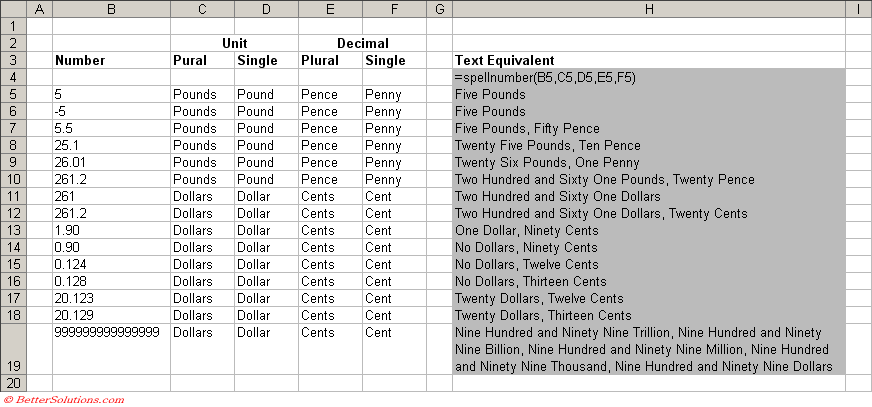
|
1 - What is the number '6' converted to words.
What is the number '-5' converted to words.
2 - What is the number '6' converted to words with the pound unit attached.
3 - What is the number '1' converted to words.
4 - What is the number '200' converted to words.
5 - What is the number '2017' converted to words.
6 - What is the number '2017' converted to words with the pound until attached.
7 - What is the number '2004' converted to words.
8 - What is the number '1000345' converted to words.
What is '0.124' converted to words.
9 - What is the number '0.9' converted to words.
10 - What is the number '20.123' converted to words.
11 - What is the number '1000000' converted to words.
12 - What is the number '50000000' converted to words.
13 - What is the number '50003600' converted to words.
14 - What is the number '1001001100' converted to words.
15 - What is the number '1001001110' converted to words.
16 - What is the number '9999999999999' converted to words.
Public Function SPELLNUMBER( _
ByVal dbMyNumber As Double, _
ByVal sMainUnitPlural As String, _
ByVal sMainUnitSingle As String, _
Optional ByVal sDecimalUnitPlural As String = "", _
Optional ByVal sDecimalUnitSingle As String = "") _
As Variant
Dim sMyNumber As String
Dim sConcat As String
Dim sDecimalText As String
Dim sTemp As String
Dim iDecimalPlace As Integer
Dim iCount As Integer
ReDim Place(9) As String
Application.Volatile (True)
Place(2) = "Thousand"
Place(3) = "Million"
Place(4) = "Billion"
Place(5) = "Trillion"
sMyNumber = Trim(CStr(dbMyNumber))
iDecimalPlace = InStr(dbMyNumber, ".")
If (iDecimalPlace > 0) Then
sDecimalText = GetTens(Left(Mid(Round(sMyNumber, 2), iDecimalPlace + 1) & "00", 2))
If Len(sDecimalText) > 0 Then
sMyNumber = Trim(Left(sMyNumber, iDecimalPlace - 1))
Else
sMyNumber = ""
End If
End If
iCount = 1
Do While sMyNumber <> ""
sTemp = GetHundreds(sMyNumber, Right(sMyNumber, 3), iDecimalPlace)
If (sTemp <> "") Then
If (iCount > 1) And (LCase(Left(Trim(sConcat), 3)) <> "and") Then
sConcat = ", " & sConcat
End If
sConcat = sTemp & Place(iCount) & sConcat
End If
If (Len(sMyNumber) > 3) Then
sMyNumber = Left(sMyNumber, Len(sMyNumber) - 3)
Else
sMyNumber = ""
End If
iCount = iCount + 1
Loop
Select Case Trim(sConcat)
Case "": sConcat = "No " & sMainUnitPlural
Case "One": sConcat = "One " & sMainUnitSingle
Case Else: sConcat = sConcat & sMainUnitPlural
End Select
If (iDecimalPlace > 0) Then
If (Len(sDecimalUnitPlural) > 0 And Len(sDecimalUnitSingle) > 0) Then
sConcat = sConcat & ", "
Select Case Trim(sDecimalText)
Case "": sDecimalText = "No " & sDecimalUnitPlural
Case "One": sDecimalText = "One " & sDecimalUnitSingle
Case Else: sDecimalText = sDecimalText & sDecimalUnitPlural
End Select
Else
sConcat = sConcat & " and "
sDecimalText = Mid(Trim(Str(dbMyNumber)), iDecimalPlace + 1) & "/100"
End If
End If
SPELLNUMBER = Trim(sConcat & sDecimalText)
End Function
Function GetHundreds(ByVal sMyNumber As String, _
ByVal sHundredNumber As String, _
ByVal iDecimal As Integer) As String
Dim sResult As String
If (sHundredNumber = "0") Then
Exit Function
End If
sHundredNumber = Right("000" & sHundredNumber, 3)
If Mid(sHundredNumber, 1, 1) <> "0" Then
sResult = GetDigit(Mid(sHundredNumber, 1, 1)) & "Hundred"
End If
If (sMyNumber > 1000) And (Mid(sHundredNumber, 3, 1) <> "0" Or _
Mid(sHundredNumber, 2, 1) <> "0") Or _
(Len(sResult) > 0) And (Mid(sHundredNumber, 3, 1) <> "0" Or _
Mid(sHundredNumber, 2, 1) <> "0") Then
sResult = sResult & " and "
End If
If Mid(sHundredNumber, 2, 1) <> "0" Then
sResult = sResult & GetTens(Mid(sHundredNumber, 2))
Else
If Mid(sHundredNumber, 3, 1) <> "0" Then
sResult = sResult & GetDigit(Mid(sHundredNumber, 3))
Else
sResult = sResult & " "
End If
End If
GetHundreds = sResult
End Function
Function GetTens(ByVal sTensText As String) As String
Dim sResult As String
sResult = ""
If Left(sTensText, 1) = 1 Then
Select Case sTensText
Case "10": sResult = "Ten "
Case "11": sResult = "Eleven "
Case "12": sResult = "Twelve "
Case "13": sResult = "Thirteen "
Case "14": sResult = "Fourteen "
Case "15": sResult = "Fifteen "
Case "16": sResult = "Sixteen "
Case "17": sResult = "Seventeen "
Case "18": sResult = "Eighteen "
Case "19": sResult = "Nineteen "
Case Else
End Select
Else
Select Case Left(sTensText, 1)
Case "2": sResult = "Twenty "
Case "3": sResult = "Thirty "
Case "4": sResult = "Forty "
Case "5": sResult = "Fifty "
Case "6": sResult = "Sixty "
Case "7": sResult = "Seventy "
Case "8": sResult = "Eighty "
Case "9": sResult = "Ninety "
Case Else
End Select
sResult = sResult & GetDigit(Right(sTensText, 1))
End If
GetTens = sResult
End Function
Function GetDigit(ByVal sDigit As String) As String
Select Case sDigit
Case "1": GetDigit = "One "
Case "2": GetDigit = "Two "
Case "3": GetDigit = "Three "
Case "4": GetDigit = "Four "
Case "5": GetDigit = "Five "
Case "6": GetDigit = "Six "
Case "7": GetDigit = "Seven "
Case "8": GetDigit = "Eight "
Case "9": GetDigit = "Nine "
Case Else: GetDigit = ""
End Select
End Function
![]() |
© 2026 Better Solutions Limited. All Rights Reserved. © 2026 Better Solutions Limited TopPrevNext
