CONTAINS
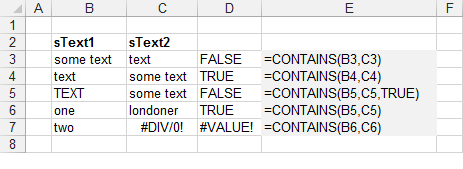
CONTAINS(sText1, sText2, bIgnoreCase)
Returns whether a string is contained inside another string.
| sText1 | The text string containing your substring. |
| sText2 | The text string to look for. |
| bIgnoreCase | (Optional) Whether you want to ignore the case of the text. |
REMARKS
Public Function CONTAINS( _
Public Function CONTAINS( _
         ByVal sText1 As String, _
         ByVal sText2 As String, _
Optional ByVal bIgnoreCase As Boolean = False) _
         As Boolean

   Call Application.Volatile(True)

   CONTAINS = False
   If Len(sText1) = 0 Or Len(sText2) = 0 Then Exit Function

   If bIgnoreCase = False Then
      If UCase(sText2) Like "*" & UCase(sText1) & "*" Then
         CONTAINS = True
      End If
   Else
      If sText2 Like "*" & sText1 & "*" Then
         CONTAINS = True
      End If
   End If
End Function
 |
For instructions on how to add this function to a workbook refer to the page under Inserting Functions
© 2026 Better Solutions Limited. All Rights Reserved. © 2026 Better Solutions Limited TopPrevNext