COUNTFORMAT
COUNTFORMAT()
Returns the number of cells that have been formatted with multiple attributes.
| rgeValues | The range of values |
| geExampleCell | The cell whose format you want to count |
| bCheckBackGround | Whether you want to check the background formatting |
| bCheckFontColor | Whether you want to check the text formatting |
REMARKS
This function will not update automatically every time a cell format changes although pressing F9 will work.
Need a function that can detect any cell formatting (not a specific colour)
4 Functions that allow you to count different types of formatting.
* You can use the built-in COUNT function to
* You can use the user defined COUNTSUBSTRING function to
Public Function COUNTFORMAT( _
Public Function COUNTFORMAT( _
         ByVal rgeValues As Range, _
         ByVal rgeExampleCell As Range, _
Optional ByVal bCheckBackGround As Boolean = True, _
Optional ByVal bCheckFontColor As Boolean = False, _
Optional ByVal bCheckFontBold As Boolean = False) _
         As Integer

Dim objcell As Range
Dim itotalcells As Integer
Dim bbackground_check As Boolean
Dim bfontcolour_check As Boolean
Dim bfontbold_check As Boolean

   itotalcells = 0
   For Each objcell In rgeValues
      bbackground_check = True
      bfontcolour_check = True
      bfontbold_check = True

      If (bCheckBackGround = True) Then
         If objcell.Interior.ColorIndex <> rgeExampleCell.Interior.ColorIndex Then
            bbackground_check = False
         End If
      End If

      If (bCheckFontColor = True) Then
         If objcell.Font.ColorIndex <> rgeExampleCell.Font.ColorIndex Then
            bfontcolour_check = False
         End If
      End If

      If (bCheckFontBold = True) Then
         If (objcell.Font.Bold = False) Then
            bfontbold_check = False
         End If
      End If

      If (bbackground_check = True) And (bfontcolour_check = True) And (bfontbold_check = True) Then
         itotalcells = itotalcells + 1
      End If

   Next objcell

   COUNTFORMAT = itotalcells
End Function
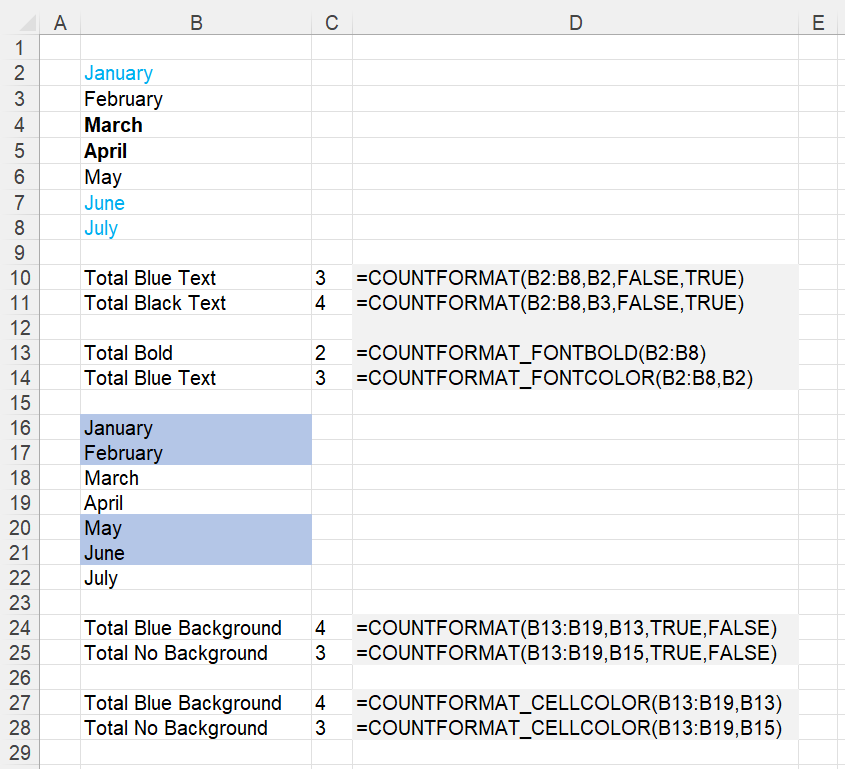 |
COUNTFORMAT_CELLCOLOR
Returns the number of cells that have been formatted with a particular colour.
'rgeSearchCells - The range of cells you want to check
'rgeExampleCell - The cell with the colour you want to count

Public Function COUNTFORMAT_CELLCOLOR( _
         ByVal rgeColouredCells As Range, _
         ByVal rgeExampleCell As Range) As Long

Dim ltotal As Long
Dim rgecell As Range
Dim lcellcolour As Long

   lcellcolour = rgeExampleCell.Interior.ColorIndex
   For Each rgecell in rgeColouredCells
      If rgecell.Interior.ColorIndex = lcellcolour Then
         ltotal = ltotal + 1
      End If
   Next rgecell

   COUNTFORMAT_CELLCOLOR = ltotal
End Function
COUNTFORMAT_FONTBOLD
Returns the number of cells that have been formatted in bold.
'rgeSearchCells - The range of cells you want to check

Public Function COUNTFORMAT_FONTBOLD( _
         ByVal rgeSearchCells As Range) As Long

Dim ltotal As Long
Dim rgecell As Range

   For Each rgecell In rgeSearchCells
      If (rgecell.Font.Bold = True) Then
         ltotal = ltotal + 1
      End If
   Next rgecell

   COUNTFORMAT_FONTBOLD = ltotal
End Function
COUNTFORMAT_FONTCOLOR
Returns the number of cells that have been formatted with a particular font colour.
'rgeSearchCells - The range of cells you want to check
'rgeExampleCell - The cell with the font colour you want to count

Public Function COUNTFORMAT_FONTCOLOR( _
         ByVal rgeSearchCells As Range, _
         ByVal rgeExampleCell As Range) As Long

Dim ltotal As Long
Dim lfontcolor As Long
Dim rgecell As Range

   lfontcolor = rgeExampleCell.Font.Color
   For Each rgecell In rgeSearchCells
      If (rgecell.Font.Color = lfontcolor) Then
         ltotal = ltotal + 1
      End If
   Next rgecell

   COUNTFORMAT_FONTCOLOR = ltotal
End Function
For instructions on how to add these functions to a workbook refer to the page under Inserting Functions
© 2026 Better Solutions Limited. All Rights Reserved. © 2026 Better Solutions Limited TopPrevNext